


Linux is among the most widely used operating systems in the technology industry. It supports servers, cloud infrastructure, supercomputers, networking devices, embedded systems, and many other computing environments. While it is commonly associated with technical professionals, it also matters in software development, cybersecurity, cloud computing, system administration, and DevOps. For beginners starting a career in technology, understanding this operating system can provide a strong foundation for learning various other technologies. Many cloud platforms and enterprise environments depend heavily on it, making basic knowledge a valuable skill for students, developers, system administrators, and aspiring DevOps professionals. It is also essential to DevOps training, as many DevOps tools, automation processes, servers, and deployment environments are built around this platform.
This guide introduces the operating system in simple terms, covering its history, working principles, major components, commonly used distributions, essential commands, advantages, applications, and its relevance to technology careers and DevOps training.
What Is Linux?
Linux is an open-source operating system kernel originally created by Linus Torvalds in 1991. The kernel serves as the core component of an operating system, managing communication between hardware and software. In everyday usage, the term commonly refers to complete operating systems built around this kernel. These systems are generally known as distributions, or distros. A Linux-based operating system manages resources such as the processor, memory, storage, devices, users, and applications. It provides an environment where software can run, and users can interact with the computer.
Unlike proprietary operating systems, it is developed through open-source collaboration. Its source code is available for individuals and organizations to inspect, modify, and distribute according to the applicable open-source license.
How Does it Work?
To understand it, we have to look at the relationship between hardware, the kernel, system software, and applications. The Linux kernel sits between the computer's hardware and the software running on the system. It manages resources and provides essential services that applications need.
For example, when an application needs access to memory or storage, it interacts with the operating system rather than communicating directly with the hardware.
A simplified structure can be viewed as:
Hardware → Linux Kernel → System Libraries and Utilities → Applications → User
The kernel handles important responsibilities such as:
- Process management
- Memory management
- File-system management
- Device management
- Networking
- Security and access control
This architecture allows applications to use system resources without needing to understand the details of individual hardware components.
Kernel vs Distribution
One common source of confusion for beginners is the difference between the Linux kernel and distribution.
The kernel is the core of the operating system. It manages hardware resources and provides fundamental operating-system functionality.
A distribution combines the kernel with additional software such as system utilities, package managers, libraries, desktop environments, and applications.
Some popular distributions include:
- Ubuntu
- Debian
- Fedora
- Red Hat Enterprise Linux
- Rocky Linux
- Linux Mint
- Arch Linux
- openSUSE
Different distributions are designed for different requirements. For example, some are popular for servers and enterprise environments, while others focus more on desktop usability or specialized technical workloads.
Why Is It So Popular?
Linux has gained popularity due to its flexibility, stability, security, and open-source nature. Organizations can choose suitable distributions and configure their systems based on their specific technical needs. Developers can customize their working environments and install only the software required for a particular workload.
Another key advantage is its widespread use in server and cloud environments. Many organizations rely on it to host websites, applications, databases, containers, and various other services.
It also has an important role in modern DevOps, as automation, containerization, orchestration, configuration management, and CI/CD tools commonly operate within such environments.
Important Features of Linux
It offers several features that make it suitable for a wide variety of computing environments.
Open Source
It is open source, allowing developers and organizations to study, modify, and contribute to the software under its licensing terms.
Multiuser
It can support multiple users and provides mechanisms for managing user accounts, permissions, and access to resources.
Multitasking
The operating system can run multiple processes at the same time and manage the resources required by those processes.
Security
It provides user permissions, file permissions, authentication mechanisms, process isolation, and other security capabilities. Proper configuration and administration remain essential for maintaining a secure system.
Stability
It is widely used for systems that require long-running and reliable operation, including servers and infrastructure environments.
Flexibility
It can run on different types of hardware and can be configured for desktops, servers, embedded systems, cloud infrastructure, and specialized computing environments.
Linux File System
The Linux file system is another important concept for beginners. Unlike Windows, where drives are commonly represented using letters such as C: or D:, Linux uses a hierarchical file-system structure that begins at the root directory, represented by /.
Some commonly encountered directories include:
- /home – stores users' personal files
- /etc – contains many system configuration files
- /var – stores variable data such as logs
- /tmp – commonly used for temporary files
- /usr – contains many user-space programs and resources
- /bin – contains essential command binaries on systems where this directory is used separately
Understanding the file system helps administrators and developers navigate Linux environments and locate configuration files, logs, applications, and user data.
Basic Linux Commands Beginners Should Know
One of the most important skills for working with Linux is using the command line.
The terminal allows users to perform administrative and development tasks efficiently without relying entirely on a graphical interface.
Some commonly used commands include:
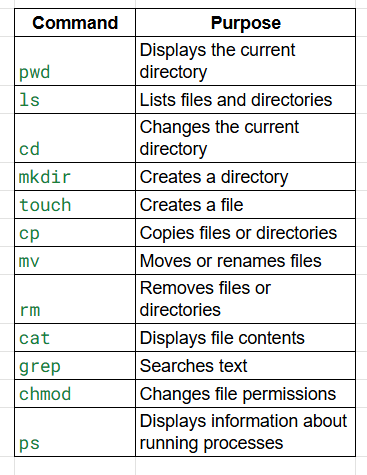
Beginners should learn these commands through practice rather than simply memorizing them. Working with a small Linux virtual machine or a safe practice environment can help learners understand how commands affect files, processes, and system resources.
Linux and DevOps
Linux knowledge is especially important for individuals pursuing a career in DevOps, as many DevOps tools and workflows run in this environment. Professionals may be responsible for managing servers, configuring applications, analyzing logs, automating tasks, working with containers, and resolving deployment issues.
A DevOps engineer may use it to:
- Manage application servers
- Configure users and permissions
- Monitor running processes
- Examine system logs
- Automate repetitive tasks using shell scripts
- Configure network settings
- Work with Docker and containers
- Support CI/CD pipelines
- Troubleshoot production environments
For these reasons, it is commonly taught as a fundamental topic in DevOps and cloud-computing learning paths.
For Cloud Computing
Cloud platforms have made Linux skills even more relevant. Organizations commonly create virtual machines and cloud instances based on it to host applications, APIs, databases, websites, and infrastructure services.
A cloud professional may need to connect to a server remotely, install software, configure services, manage permissions, review logs, and troubleshoot performance issues.
It therefore provides an important foundation for understanding how cloud infrastructure operates at the operating-system level.
Linux in Cybersecurity
Linux is also widely used in cybersecurity. Security professionals use environments based on it for network analysis, security testing, digital forensics, vulnerability assessment, monitoring, and other activities.
Specialized distributions such as Kali provide collections of security-related tools for authorized testing and security research.
However, using security tools responsibly requires appropriate authorization and a clear understanding of legal and ethical boundaries.
Advantages and Limitations of Linux
It offers several advantages:
- Open-source development
- High flexibility and customization
- Strong server and cloud ecosystem
- Powerful command-line tools
- Extensive community support
- Efficient resource usage in many environments
- Strong integration with developer and DevOps tooling
However, Linux can also present challenges for beginners. The command line can initially feel unfamiliar, and different distributions may use different package-management systems or configuration approaches.
Some commercial applications and games may also have better support on other operating systems. Therefore, choosing it depends on the user's requirements, technical environment, applications, and level of experience.
Is Linux Difficult to Learn?
Linux is not necessarily difficult to learn, but it requires consistent practice. Beginners can start with basic concepts such as navigating directories, creating and managing files, understanding users and permissions, installing software, and monitoring processes. Once these fundamentals become comfortable, learners can progress to shell scripting, networking, system administration, containers, cloud computing, and DevOps automation.
A structured learning approach can make the process easier because each concept builds on the previous one.
Why Should Students Learn Linux?
It can be a valuable skill for students and professionals planning careers in several technology fields. It can support career paths such as:
- DevOps Engineer
- Cloud Engineer
- System Administrator
- Site Reliability Engineer
- Cybersecurity Professional
- Backend Developer
- Platform Engineer
- Network Engineer
More importantly, it teaches learners how operating systems, processes, files, permissions, networking, and system resources work. These fundamentals can be applied across different technologies and environments.
Final Thoughts
Linux is much more than a command-line operating system. It is a major foundation of modern computing and plays an important role in servers, cloud platforms, software development, cybersecurity, embedded systems, and DevOps.
For beginners, the best way to learn is through hands-on practice. Starting with basic commands and file management and gradually moving toward permissions, networking, shell scripting, and system administration can create a strong technical foundation.
For learners planning to enter cloud or DevOps, Linux is especially valuable because it provides practical knowledge of the environments where many applications and infrastructure tools operate. Join Paperlive Learning for hands-on DevOps training with more than 20+ projects, case studies, and 100 % job opportunities.
Frequently Asked Questions
1. What is Linux?
It is an open-source operating system kernel used as the foundation of many operating systems and computing environments.
2. Is it an operating system?
Technically, it is a kernel. In everyday usage, the term commonly refers to complete operating systems built around the kernel.
3. What is a Linux distribution?
A distribution combines the kernel with system tools, libraries, package managers, and other software.
4. Is it free to use?
Many distributions are available at no licensing cost, although commercial distributions may offer paid subscriptions and support services.
5. Is Linux useful for DevOps?
Yes. It is widely used in servers, cloud infrastructure, containers, automation, and DevOps environments.
6. Which distribution is best for beginners?
Ubuntu is a popular starting point because of its beginner-friendly ecosystem and extensive documentation.
7. Is it difficult for beginners?
It may initially require learning the command line, but beginners can learn it progressively through regular hands-on practice.
8. Why should DevOps professionals learn it?
Knowledge of the system helps DevOps professionals manage servers, troubleshoot systems, automate tasks, work with containers, and support deployment environments.
9. Can these skills help with cloud careers?
Yes, as they are widely used for cloud servers and infrastructure, making their fundamentals valuable for cloud professionals.
10. Where can beginners learn it?
Beginners can learn through structured courses, official documentation, guided labs, and hands-on projects that provide practical experience.



