
If you've ever wondered how developers ensure an application works the same on a laptop, a testing server, and the cloud, the answer often starts with Docker. Docker has transformed modern software development by making applications portable, scalable, and easier to deploy. Whether you're a developer, DevOps engineer, system administrator, or someone beginning a career in cloud computing, understanding Docker is an essential skill.
In this guide, you'll learn what Docker is, how it works, its key components, benefits, use cases, and frequently asked questions.
What Is Docker?
Docker is an open-source containerization platform that enables developers to package an application along with all its dependencies, libraries, and configurations into a lightweight, portable unit called a container.
These containers can run consistently across different environments, including local computers, testing servers, on-premises infrastructure, and cloud platforms.
Simply, Docker ensures that an application behaves the same regardless of where it is deployed.
What Is a Docker Container?
A Docker container is a lightweight, isolated runtime environment that includes:
- Application source code
- Runtime environment
- System libraries
- Dependencies
- Configuration files
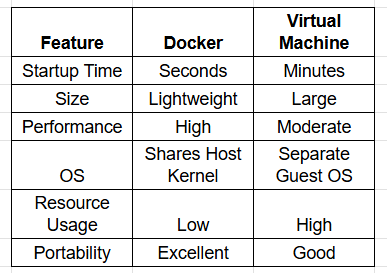
Unlike traditional virtual machines, containers share the host operating system's kernel, making them significantly faster and more resource-efficient.
Example
Imagine building a Python web application.
Without Docker:
- Your laptop uses Python 3.12
- Testing server uses Python 3.10
- Production uses Python 3.9
This difference may cause the application to fail.
With Docker:
The application runs inside a container with the exact Python version and dependencies, ensuring identical behavior everywhere.
How Does Docker Work?
Docker uses containerization technology to isolate applications while sharing the host operating system.
The workflow typically looks like this:
- Write your application.
- Create a Dockerfile describing the environment.
- Build a Docker image.
- Run the image as one or more Docker containers.
- Deploy the container anywhere Docker is installed.
This consistency is one of Docker's greatest strengths.
Key Components of Docker
Understanding Docker becomes easier once you're familiar with its core components.
1. Docker Engine
Docker Engine is the core service responsible for creating and managing containers.
It includes:
- Docker daemon
- Docker API
- Docker CLI
2. Docker Image
A Docker image is a read-only template used to create containers.
It contains:
- Application code
- Runtime
- Libraries
- Environment variables
- Dependencies
Think of an image as a blueprint.
3. Docker Container
A container is the running instance of a Docker image.
You can create multiple containers from the same image.
4. Dockerfile
A Dockerfile is a text file containing instructions for building an image.
Example:
FROM python:3.12
WORKDIR /app
COPY . .
RUN pip install -r requirements.txt
CMD ["python","app.py"]
5. Docker Hub
Docker Hub is Docker's public repository where developers can:
- Download images
- Share images
- Store custom images
- Access official software images
Examples include:
- Ubuntu
- MySQL
- Redis
- PostgreSQL
- Nginx
- Node.js
Why Is Docker Important?
Modern software development demands faster delivery, scalability, and consistency.
Docker solves several common challenges.
Consistent Environments
Applications behave the same across development, testing, and production.
Faster Deployment
Containers start in seconds, enabling rapid releases.
Better Resource Utilization
Containers consume fewer resources than virtual machines.
Simplified Collaboration
Developers can share complete application environments instead of manually configuring systems.
Easy Scaling
Organizations can launch multiple container instances quickly to handle increased traffic.
Docker vs Virtual Machines
Benefits of Docker
Faster Development
Developers spend less time fixing environment-related issues.
Improved Portability
Containers run consistently across Windows, Linux, macOS, cloud platforms, and servers.
Easy CI/CD Integration
Docker integrates seamlessly with modern Continuous Integration and Continuous Deployment pipelines.
Better Scalability
Applications can scale horizontally by launching additional containers.
Simplified Dependency Management
Every dependency required by the application is packaged inside the container.
Cost Efficiency
Lower infrastructure usage reduces operational costs.
Common Use Cases of Docker
Docker is widely used across industries.
Web Application Deployment
Deploy applications consistently across multiple environments.
Microservices Architecture
Package each service independently for easier development and scaling.
DevOps Automation
Docker simplifies automated testing and deployment workflows.
Cloud-Native Applications
Most cloud platforms support Docker-based deployments.
Data Science
Create reproducible environments for machine learning and analytics projects.
Testing
Run isolated environments for automated testing without affecting production systems.
Basic Docker Workflow
A typical Docker workflow looks like this:
- Write application code.
- Create a Dockerfile.
- Build a Docker image.
- Store the image in Docker Hub or a private registry.
- Deploy containers.
- Scale containers as needed.
This workflow supports rapid, repeatable deployments.
Who Should Learn Docker?
It is valuable for professionals in many technical roles, including:
- Software Developers
- DevOps Engineers
- Cloud Engineers
- Backend Developers
- Full-Stack Developers
- Site Reliability Engineers (SREs)
- QA Engineers
- System Administrators
- Students learning cloud computing
These skills are increasingly requested in cloud and DevOps job postings.
Frequently Asked Questions (FAQs)
What is Docker in simple words?
Docker is a platform that packages applications and their dependencies into containers so they run consistently across different environments.
Is Docker a virtual machine?
No, it uses containers, which share the host operating system's kernel. Virtual machines require a separate guest operating system for each instance.
Why do developers use Docker?
Developers use Docker to eliminate environment-related issues, simplify deployments, improve collaboration, and accelerate software delivery.
Is Docker free?
It offers a free Community Edition for many individual developers and provides paid plans with additional features for teams and enterprises.
Can Docker run on Windows?
Yes, it supports Windows, macOS, and Linux. On Windows, Docker Desktop enables developers to build and run containers efficiently.
What is the difference between Docker and Kubernetes?
Docker is used to build and run containers, while Kubernetes is used to orchestrate, scale, and manage large numbers of containers across multiple machines.
Conclusion
Docker has become a foundational technology in modern software development because it solves one of the industry's biggest challenges: ensuring applications run consistently across different environments. By packaging applications and their dependencies into lightweight containers, Docker improves portability, speeds up deployments, optimizes resource usage, and streamlines collaboration between development and operations teams.
Whether you're building web applications, deploying microservices, automating CI/CD pipelines, or preparing for a career in cloud computing and DevOps, learning it is a worthwhile investment. As organizations continue to adopt cloud-native architectures, it remains a critical tool for creating reliable, scalable, and efficient applications.
Paperlive Learning's DevOps Training equips you with practical skills in Kubernetes, Docker, Terraform, AWS, Jenkins, Git, Linux, and CI/CD to help you succeed in cloud and DevOps roles.