


Application software development teams are always faced with the challenge of developing, scaling, and maintaining the reliability of their applications. In many instances, the traditional methods used in software development and operations have not been able to handle such challenges. Here comes AWS DevOps. It combines the DevOps methodologies and automation processes with AWS cloud solutions in order to effectively develop, test, deploy, monitor, and manage applications. It should be noted that AWS DevOps is not a particular AWS cloud solution or technology.
In this guide, we are going to explore what AWS DevOps means, how it works, the key AWS services involved, and its benefits. We’ll also look at how a DevOps course can help you build practical skills.
What Is AWS DevOps?
This concept involves the implementation of DevOps methodologies and automation in the AWS cloud computing infrastructure for effective deployment of software applications.
The main benefits of DevOps include:
- Collaboration
- Automation
- Continuous Integration
- Continuous Delivery
- Infrastructure as Code
- Continuous Monitoring
- Continuous Feedback
AWS has a wide array of products available to cater to all phases of this process. For instance, an application development process may involve the use of AWS CodeCommit or GitHub for version control, AWS CodeBuild for building applications, AWS CodeDeploy for deployment, and Amazon CloudWatch for application and infrastructure monitoring.
How Does AWS DevOps Work?
Below is what a typical DevOps development lifecycle in AWS looks like:
Plan ➞ Code ➞ Build ➞ Test ➞ Deploy ➞ Monitor ➞ Feedback
Let's say there is a developer who performs a change in the application. The change gets stored in the source code repository. There might be a case where a CI/CD pipeline would automatically perform the build and testing processes, package the software, and deploy it to AWS.
When all of these activities are done, the monitoring process begins to monitor the metrics of the application and infrastructure. If there is any failure, then feedback will be given.
Key AWS DevOps Services
AWS offers services covering different parts of the DevOps lifecycle.
1. AWS CodeCommit
AWS CodeCommit is a managed source control service built around Git. It can be used to host application source code and manage development collaborations. But in organizations, AWS DevOps pipelines are often integrated with third-party Git services like GitHub and GitLab.
2. AWS CodeBuild
AWS CodeBuild is a service used to build and test source code for deployment by automating the process. This helps avoid configuring build servers.
3. AWS CodeDeploy
AWS CodeDeploy is software that automates application deployment to computers such as those in Amazon EC2.
4. AWS CodePipeline
AWS CodePipeline assists in the automation of software delivery workflow stages.
For example, a pipeline can include the following steps:
Source → Build → Test → Deploy
Thus, code modifications can flow through the software delivery process automatically.
5. Amazon CloudWatch
DevOps goes further than deployment. Amazon CloudWatch is a monitoring and observability service that helps monitor AWS resources and applications. Metrics, logs, and other information can be collected from applications to detect and analyze their issues.
6. AWS CloudFormation
However, deployment of the application alone is not enough. There is a need for deployment of the infrastructure of the application too. With AWS CloudFormation, the developer is able to code the AWS infrastructure.
7. Amazon EKS
With respect to container deployment, EKS offers managed Kubernetes services from Amazon.
AWS DevOps Tools vs DevOps Tools on AWS
One important distinction often gets missed. AWS DevOps is not limited to tools that come from AWS. A practical example of DevOps can be a scenario where AWS tools coexist with other widely used tools.
For example:
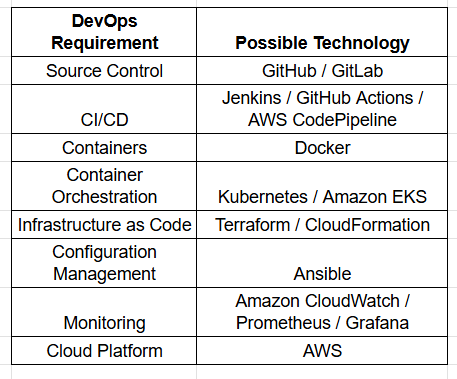
AWS DevOps Architecture
A simplified AWS DevOps architecture can look like this:
Developer
↓
Git Repository
↓
CI/CD Pipeline
↓
Build & Automated Testing
↓
Container / Application Artifact
↓
AWS Infrastructure
↓
Deployment
↓
Monitoring & Logging
↓
Feedback
Benefits of AWS DevOps
Quick Software Deployment
Automation leads to a decrease in manual activities in software development and deployment.
Increased Reliability
Automated testing and consistent deployment minimize errors in deployment configurations.
Elasticity
AWS offers an elastic cloud-based infrastructure where scalability is determined by the requirements of the application.
Infrastructure Automation
The application of IaC results in the development of an environment that is easily reproducible and manageable.
Continuous Monitoring
Insight can be gained about application and infrastructure health through monitoring and logging.
Improved Recovery
Infrastructure automation, monitoring, and roll-back plans may improve response times to failures.
AWS DevOps vs Traditional IT Operations
Traditional environments often separate development, infrastructure, testing, and operations into different stages.
A typical workflow might look like:
Develop → Handover → Test → Operations → Deploy
Handovers may always lead to potential delays. DevOps aims to break down such silos. With AWS DevOps, both developers and operations teams operate within a single set of automation, infrastructure, deployment pipeline, monitoring, and feedback loop. It is not merely a question of deploying faster. Rather, it is a question of creating a reliable system.
Is AWS DevOps the Same as DevOps?
No. It is just a generic term wherein development and operations are performed via automation, CI/CD, IaC, monitoring, and collaboration.
DevOps on AWS involves the use of different AWS tools like Docker, Kubernetes, Terraform, and Jenkins.
What Skills Are Required for AWS DevOps?
A strong AWS DevOps professional typically needs knowledge across several areas:
- Linux
- Git and GitHub
- Networking fundamentals
- AWS services
- CI/CD
- Docker
- Kubernetes
- Infrastructure as Code
- Terraform or CloudFormation
- Configuration management
- Monitoring and logging
- Security
- Scripting
The role is therefore much broader than simply knowing how to launch an EC2 instance.
AWS DevOps in Real-World Applications
Imagine a company that uses e-commerce applications hosted on AWS. Once a developer uploads new code onto GitHub, the CI/CD pipeline triggers the building process. Automated tests follow to verify whether everything is done as supposed to be. When the automated tests succeed, a Docker image is deployed to the Kubernetes cluster hosted on Amazon EKS. Meanwhile, CloudWatch collects metrics for both application and infrastructure. In case of a traffic spike, AWS services are able to scale up depending on the architecture and parameters of the system. The development team receives insights continuously. Understand how each change affects customers. Insights enable us to identify improvements and incorporate them into the next development cycle. This is how AWS DevOps works.
Frequently Asked Questions
What is AWS DevOps in words?
It is the way to create, check, send out, keep an eye on, and take care of applications in a way by using DevOps ideas, automatic actions, and services from the AWS cloud.
Is AWS DevOps a tool?
No. It is not a tool. It brings together DevOps methods, AWS services, automatic processes, and other helpful technologies.
Does AWS need DevOps?
No. DevOps can be used on AWS, Microsoft Azure, Google Cloud, local systems, or mixed setups. AWS is one of the well-known cloud platforms for doing DevOps work.
What is AWS and AWS DevOps? What does AWS mean?
AWS is a computing platform that provides hardware and other services. AWS DevOps is the way to use AWS and other tools to do DevOps tasks like CI/CD, automation, Infrastructure as Code, keeping track, and sending out updates regularly.
Does AWS DevOps use Docker?
Docker is not a part of AWS. Is often used in AWS DevOps setups to put programs into easy-to-move containers. Workloads that are in containers can be run using AWS services, like Amazon EKS and Amazon ECS.
Final Thoughts
AWS DevOps is not about memorizing all the AWS services. It's about understanding how software goes from code to production. It’s about seeing how that whole journey can be automated and made better.
AWS gives you the cloud infrastructure and managed services. DevOps brings the practices and culture. Tools like Docker, Kubernetes, Terraform, Git, and Jenkins help connect everything together. When you put them all together, you get a software delivery environment. One that focuses on speed, automation, reliability, scalability, and constant improvement.
For anyone heading into cloud engineering or DevOps, learning AWS DevOps is a step. It helps bridge the gap between application development and cloud infrastructure. Start your DevOps training with Paperlive Learning



