


Infrastructure as Code (IaC) is the foundation of modern cloud operations. Increasingly, organisations are automating the provisioning of infrastructure to achieve faster deployments, better consistency and fewer operational errors.Terraform and AWS Cloud Formation continue to be the most discussed Infrastructure as Code tools. Both offer infrastructure deployment automation but differ significantly in terms of flexibility, ecosystem support, learning curve, and cloud support.
So you’re an IT Pro looking to evaluate the best IaC tool in 2026? This guide will provide a thorough comparison to help you make an informed decision.
What is Infrastructure as Code (IaC)?
Infrastructure as Code is the way we set up and manage our infrastructure using code of doing it by hand. We do not create resources through a cloud console. Instead engineers define things like servers and networks and storage and databases and cloud services in configuration files that can be set up automatically.
Using Infrastructure as Code helps organizations do a lot of things. Infrastructure as Code enables organizations to:
- Set up infrastructure
- Keep track of infrastructure in a kind of file system
- Create environments that are the same every time
- Prevent infrastructure from getting out of sync
- Get back up. Running quickly if something goes wrong
- Help development and operations teams work together better
- Add more infrastructure quickly and reliably
Infrastructure as Code is a big part of DevOps because it helps us be more consistent and reduces mistakes. Infrastructure as Code makes it easier to manage our infrastructure across environments like development, testing, and production.
Both Terraform and AWS CloudFormation use Infrastructure as Code. They do it in different ways. Terraform is a tool that works with different providers. AWS CloudFormation is designed to work with AWS infrastructure.
What is Terraform?
Terraform is a software tool to manage your computer infrastructure as code. HashiCorp created it. Available for free, Terraform lets you describe the shape of the infrastructure you want. It makes it happen. That’s different from spinning up resources in cloud consoles.
Terraform can set up types of resources such as:
- Virtual Machines
- Kubernetes Clusters
- VPCs and Networks
- Databases
- Load Balancers
- IAM Users, Roles and Policies
- Storage Buckets
- DNS Records
- Serverless Services
Terraform works by comparing what you want with what you have. Then it makes only the changes that are needed. This helps ensure that your infrastructure is set up every time and it reduces mistakes.
Terraform supports different cloud providers, including:
- AWS
- Microsoft Azure
- Google Cloud Platform (GCP)
- Oracle Cloud Infrastructure (OCI)
- Alibaba Cloud
- VMware
- Kubernetes
- GitHub
- Cloudflare
- Datadog
One of the things about Terraform is that it can work with many different clouds at the same time. This means you can use a Terraform project to set up and manage resources across multiple cloud providers. This makes Terraform a popular choice for people who use clouds.
Key Features of Terraform
- Infrastructure as Code
- Declarative syntax using HCL
- State management
- Execution planning
- Resource dependency graph
- Modular architecture
- Multi-cloud support
- Large provider ecosystem
- Version-controlled infrastructure
What is AWS CloudFormation?
AWS CloudFormation is a service from Amazon Web Services that helps you set up and manage your AWS infrastructure using templates. You write these templates in JSON or YAML. This way you do not have to create each resource one by one through the AWS Management Console. You just define what your AWS infrastructure should look like. Then you deploy it to your development, testing, and production environments.
AWS CloudFormation works well with other AWS services. This makes AWS CloudFormation a great choice for companies that only use AWS services. It makes setting up your AWS infrastructure easier, reduces mistakes, and helps keep your AWS environments consistent.
Key Features of AWS CloudFormation
- Native AWS Integration -AWS CloudFormation has Native AWS Integration. This means it supports every AWS service without needing any plugins.
- Automatic Dependency Management- This means AWS CloudFormation creates, updates, and deletes AWS resources in the order.
- Stack Management - It groups related AWS resources together, making it easier to deploy, update, and delete them.
- Automatic Rollback- If something goes wrong during deployment. It goes back to how things were
- Drift Detection -This finds AWS resources that have been changed outside of AWS CloudFormation so your AWS infrastructure stays consistent.
- AWS Identity and Access Management -This helps keep your access to AWS resources secure.
AWS CloudFormation is best for companies that only use AWS. These companies want to automate setting up their AWS infrastructure while using all the features and security that AWS has to offer. They want to use AWS CloudFormation to manage their AWS resources.
Terraform vs CloudFormation: Feature Comparison
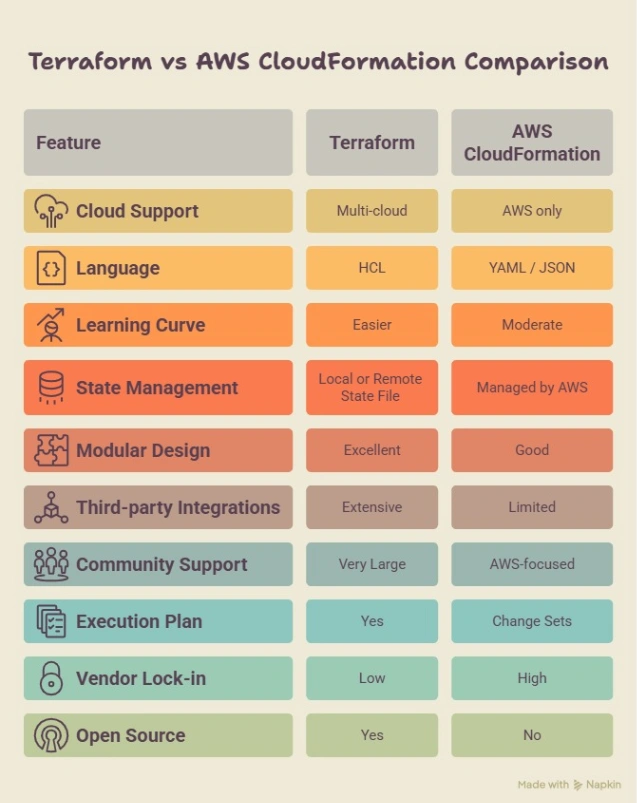
Ease of Use: Which Tool Is Simpler?
When choosing an Infrastructure as Code tool, it is important to think about how easy it's to use, especially for people who are just starting out.
Terraform
It uses HashiCorp Configuration Language, which is designed to be simple and easy to read. It is also easy to maintain. The way it is set up and the fact that it has a lot of community support make it easier to learn and work with infrastructure projects. Take the next step in your IaC journey with hands-on Terraform and DevOps training.
Advantages of Terraform
- The syntax is simple and easy to read
- You can reuse parts of the code to work faster
- You can see what will happen before you actually do it
- There are a lot of documents and people to help you
- You can use it with different cloud services
- It is easier to keep track of infrastructure projects
CloudFormation
AWS CloudFormation uses YAML or JSON templates to set up AWS infrastructure. It works well with AWS services, but the templates can get more complicated as the infrastructure gets bigger. Since it only works with AWS, you also need to understand how AWS resources and functions work.
Advantages of CloudFormation
- It is a part of AWS so you do not need any tools
- It works well with AWS services
- It can manage dependencies automatically
- It can roll back changes. Manage stacks
- It is great for people who only use AWS
Limitations of CloudFormation
- The templates can get long and complicated
- It can be harder for beginners to learn
- It only works with AWS infrastructure
- You cannot use it with cloud services as easily
Multi-Cloud Support
Which tool is better for working with multiple cloud providers?
Terraform
Terraform is a tool that helps you manage your cloud services from one place. It works with different providers like AWS, Microsoft Azure, and Google Cloud Platform. You can use Terraform to set up and manage your cloud services across providers.
Supported providers include:
- AWS
- Microsoft Azure
- Google Cloud Platform
- Kubernetes
- VMware
- GitHub
- Datadog
- Cloudflare
- Snowflake
The good things about Terraform are:
- You can manage cloud providers with one workflow
- You can avoid being locked into one vendor
- You can reuse the code across different environments
- You can make sure your deployments are consistent across cloud platforms
- Terraform has a community of users and a lot of providers
- Terraform is the best choice for companies that use multiple cloud providers.
CloudFormation
CloudFormation is a tool that is made by Amazon Web Services. It helps you set up and manage your AWS resources. It works well with AWS services. Does not need any other providers.
The good things about CloudFormation are:
- It is made for AWS infrastructure
- It works well with AWS services
- It integrates well with AWS services
- You do not need any providers
State Management
How do Terraform and CloudFormation manage the state of your cloud services?
Terraform
It stores information about your cloud services in a state file. This helps to compare the state of your services with the desired state. Then it makes the changes.
The benefits of Terraform state management are:
- Faster updates
- Tracking of your services
- Predictable execution plans
- Support for remote backends like Amazon S3
- State locking prevents multiple changes at the same time
Managing the state of your cloud services is important for team collaboration and big infrastructure projects.
CloudFormation
CloudFormation manages the state of your cloud services internally. You do not need to keep track of the state yourself.
The benefits of CloudFormation state management are:
- No manual state management
- deployment workflow
- Lower operational overhead
- Built-in stack lifecycle management
Reusability and Modular Design
Which tool is better for reusing code?
Terraform
It uses modules to package infrastructure components. Teams can standardize deployments by creating modules for resources.
The benefits are:
- Easier maintenance
- Consistent deployments
- Faster project delivery
- Better collaboration across teams
CloudFormation
CloudFormation supports stacks and reusable templates. While it is effective for AWS deployments it is generally less flexible than Terraform modules for reusable architectures.
Security
Which tool provides security?
Both tools support enterprise-grade security. Follow best practices for Infrastructure as Code.
Terraform
- Remote state encryption
- Policy as Code
- Secrets management integration
- Provider authentication
- Role-based access through cloud providers
CloudFormation
- Native AWS IAM integration
- Stack policies
- Drift detection
- AWS CloudTrail integration
- AWS Config compatibility
Performance
Which tool performs better?
Terraform
Terraform generates an execution plan before deployment. This allows teams to review infrastructure changes before they are applied. It updates the resources that have changed, making deployments efficient.
CloudFormation
CloudFormation automatically determines resource dependencies, provisions them in the order, and supports automatic rollback if the deployment fails. It is highly optimized for AWS infrastructure.
Pricing
Terraform
- The open-source edition is free
- Enterprise features are available through offerings
- Infrastructure costs depend on the underlying cloud provider
CloudFormation
- No additional charge for CloudFormation
- You only pay for the AWS resources you provision
Terraform. Cons and Pros
Pros
- Multi-cloud support
- Simple syntax
- modules
- Large provider ecosystem
- Strong community support
- Excellent for Infrastructure as Code
Cons
- Requires state file management
- Installation and provider configuration required
- Advanced workflows may need tooling
Cloud Formation Pros and Cons
Pros
- Native AWS integration
- Managed infrastructure state
- Automatic rollback
- Strong IAM integration
- No additional software installation
Cons
- Limited to AWS
- More verbose templates
- Portable across cloud providers
- Smaller ecosystem than Terraform
Best Use Cases
Choose Terraform If
- You manage multiple cloud providers.
- You want to avoid vendor lock-in.
- Infrastructure portability is important.
- You need Infrastructure as Code modules.
- Your DevOps team manages hybrid or cloud environments.
- You want a tool for cloud infrastructure automation.
- Your infrastructure runs entirely on AWS.
- You prefer AWS- services.
- You need integration with AWS IAM, CloudTrail
Choose CloudFormation If
- You want AWS to manage infrastructure state automatically.
- Your organization follows an AWS- cloud strategy.
Which Infrastructure as Code Tool Should You Choose in 2026?
The right choice for your company depends on what you want to do with the cloud. If you are using different cloud services or you think you will use more than just Amazon Web Services, then Terraform is a better choice. It is easy to use and works with a lot of different services. This makes it a great tool for teams that work on developing and operating software. If you only use Amazon Web Services and you want something that works well with those services, then CloudFormation is still a good choice. It makes managing your infrastructure easier. Works seamlessly with Amazon Web Services.
For people who work with computers in 2026, Terraform will be a better choice in the long run because it is more flexible.CloudFormation is still a good choice if you only use Amazon Web Services. Terraform is an option because it can be used with many different cloud services, and CloudFormation is good for people who only use Amazon Web Services. If you're looking to build practical expertise in Terraform, Infrastructure as Code (IaC), and modern DevOps practices, our online DevOps course provides hands-on training with real-world projects to help you gain job-ready skills and advance your cloud career.
Frequently Asked Questions (FAQs)
Is Terraform better than CloudFormation?
Terraform is really good for people who use different clouds and hybrid clouds. On the other hand , CloudFormation is the best choice if you only use AWS.
Is CloudFormation free?
Yes, it is free. You do not have to pay to use CloudFormation. You only pay for the things you use on AWS that CloudFormation sets up for you.
Which IaC tool is easier to learn?
Terraform is easier to learn. This is because Terraform has a way of writing code and it has a lot of reusable parts. Also, there are people who use Terraform and can help you
Can Terraform manage AWS resources?
Yes, Terraform can do that. Terraform works well with AWS.. It can also manage things on other cloud providers.
Should beginners learn Terraform or CloudFormation first?
If you are just starting out you should probably start with Terraform.. If you only work with AWS then you should start with CloudFormation. Most people start with Terraform because it is a tool for many different situations.



