DevOps Tools are really important for software development these days. They help teams work together efficiently, automate tasks that take a lot of time, and get applications out faster with fewer mistakes.
From managing source code to using containers, monitoring, and setting up infrastructure, DevOps Tools make every part of the software development process easier. Whether you are just starting out with DevOps or you are an engineer looking to improve your workflow, it is essential to learn about the right DevOps Tools.
In this guide, we will talk about the DevOps Tools that people are using in 2026, what they can do, and how to choose the right ones for your projects.
So what are DevOps Tools?
DevOps Tools are software applications that help automate, manage, and simplify software development, software testing, and IT operations. They help teams build, test, deploy, monitor, and maintain applications efficiently.
Instead of doing things over and over again manually, DevOps teams use automation to be more consistent, reduce mistakes when deploying software, and get software out faster.
Most DevOps workflows involve tools for things like:
- Version Control
- Continuous Integration and Continuous Deployment
- Containerization
- Container Orchestration
- Infrastructure as Code
- Monitoring and Logging
- Security and Quality Analysis
Using the DevOps Tools lets organizations get software out quickly while keeping it reliable and able to handle a lot of users.
Why are DevOps Tools important?
Organizations use DevOps Tools because they improve how software is delivered and how operations are run.
Some of the benefits include:
- Getting software out with automation
- Better teamwork between development and operations teams
- Fewer manual mistakes
- Deployments that are consistent across different environments
- Better scalability and management of cloud resources
- Finding issues faster with monitoring and logging
- Stronger security with automated testing and scanning for vulnerabilities
As more people use cloud computing and Kubernetes, DevOps Tools have become a crucial part of modern software engineering.
Categories of DevOps Tools
There are categories of DevOps Tools that serve different purposes throughout the software development process.
- Version Control: Git, GitHub
- Continuous Integration and Continuous Deployment: Jenkins, GitHub Actions
- Containerization: Docker
- Container Orchestration: Kubernetes
- Infrastructure as Code: Terraform, Ansible
- GitOps: ArgoCD
- Monitoring: Prometheus, Grafana
- Logging: ELK Stack
- Code Quality: SonarQube
- Package Management: Helm
These DevOps Tools help teams make software and get it out to users more quickly.
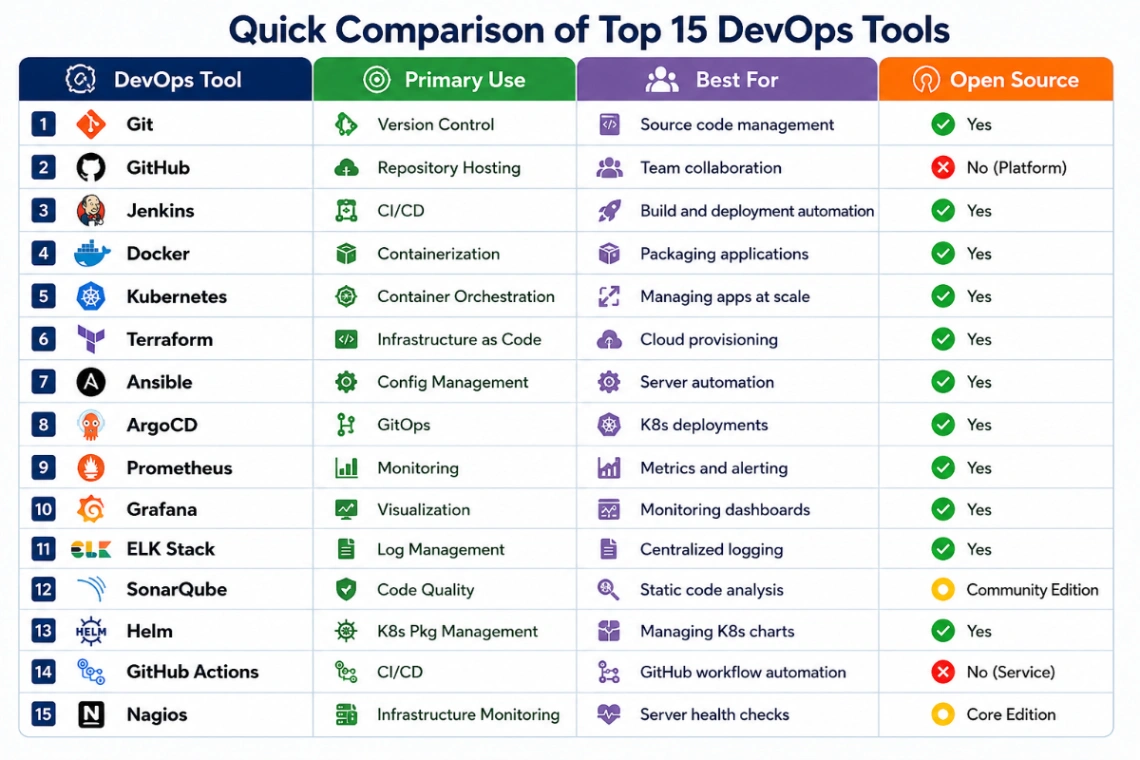
Top 15 DevOps Tools in 2026
1. Git
Git is an useful tool for developers. It helps them keep track of the changes they make to their code. Git also makes it easy for teams to work together on projects. They can manage versions of their project and go back to older versions if they need to. Every development team uses Git.
Best For
Source code management
Key Features
- Git is good at version control
- It allows branching and merging
- Teams can work with Git
- Git is really fast
2. GitHub
GitHub is a website that uses Git. It helps teams store their code and work together on projects. They can also use GitHub to manage their projects and make sure everything runs smoothly. GitHub works with other tools like GitHub Actions.
Best For
Code collaboration
Key Features
- GitHub stores code repositories
- Teams can use pull requests
- GitHub helps with issue tracking
- GitHub Actions is also integrated
3. Jenkins
Jenkins is a tool for development teams. It helps them automate their work and get things done faster. Jenkins can build, test and deploy software automatically. This saves teams a lot of time and effort.
Best For
CI/CD automation
Key Features
- Jenkins automates pipelines
- It has a lot of plugins
- Jenkins can schedule builds
- It works on platforms
4. Docker
Docker is a tool that helps teams package their applications. It makes sure the applications run the way on every computer. This solves a problem that developers often face.
Best For
Containerization
Key Features
- Docker makes containers
- It helps with lightweight deployments
- Docker gets applications to users faster
- It makes dependency management easy
5. Kubernetes
Kubernetes is a tool that helps teams manage their containers. It automates a lot of tasks. Makes sure containers run smoothly. Kubernetes is great for running applications in production.
Best For
Container orchestration
Key Features
- Kubernetes scales automatically
- It can heal itself
- Kubernetes balances loads
- It does rolling updates
6. Terraform
Terraform is a tool that helps teams manage their cloud infrastructure. It uses code to set up and manage infrastructure. Terraform works with cloud providers and makes infrastructure deployment easy.
Best For
Infrastructure automation
Key Features
- Terraform supports clouds
- It uses Infrastructure as Code
- Terraform manages state
- It has a modular architecture
7. Ansible
Ansible is a tool that helps teams automate their work. It makes server provisioning and software installation easy. Ansible uses playbooks and is easy to set up.
Best For
Configuration management
Key Features
- Ansible automates, without agents
- It uses YAML playbooks
- Ansible uses SSH
- It makes deployment
8. ArgoCD
ArgoCD is a tool that helps teams deploy their applications. It uses GitOps. Continuously monitors Git repositories. ArgoCD makes sure deployments are consistent and easy to manage.
Best For
GitOps deployments
Key Features
- ArgoCD synchronizes with Git
- It supports rollbacks
- ArgoCD has a web dashboard
- It integrates with Kubernetes
9. Prometheus
Prometheus is an open-source monitoring solution that is made for native applications. It takes in metrics from applications and from the infrastructure. It keeps those metrics in a way. It makes alerts when certain limits are gone past.
Best For
Monitoring
Key Features
- Metrics collection
- Alert manager
- Time-series database
- Kubernetes monitoring
10. Grafana
Grafana is a platform that shows data in a way. It turns metrics into dashboards that people can use. It works with Prometheus, Elasticsearch, CloudWatch and many other data sources. It helps people see how systems are doing in time.
Best For
Data visualization
Key Features
- Custom dashboards
- Real-time monitoring
- Alerting
- Multiple data sources
11. ELK Stack
The ELK Stack is made up of Elasticsearch, Logstash and Kibana. It brings together logs from applications and from infrastructure. It makes it easier to look through logs to check them and to fix problems in systems that are spread out.
Best For
Log management
Key Features
- Centralized logging
- Log analysis
- Search capabilities
- Visualization
12. SonarQube
SonarQube checks source code all the time. It finds bugs, security problems, security issues and other problems in the code. It helps teams keep code good before sending it to production.
Best For
Code quality analysis
Key Features
- Static code analysis
- Security scanning
- debt tracking
- Multi-language support
13. Helm
Helm is the tool for Kubernetes that helps with packages. It makes it easier to put applications on Kubernetes by using things called Helm Charts. It makes managing hard Kubernetes applications easier. It also helps with keeping track of versions and going back if needed.
Best For
Kubernetes package management
Key Features
- Helm Charts
- Version control
- Easy rollbacks
- Dependency management
14. GitHub Actions
GitHub Actions is the tool that GitHub has for integration and continuous delivery. It automates building, testing and sending out software. It uses workflows that happen when something happens in GitHub repositories.
Best For
CI/CD inside GitHub
Key Features
- Workflow automation
- Event-based triggers
- Container support
- Marketplace actions
15. Nagios
Nagios is a tool that has been around, for a time. It keeps an eye on servers, applications and network devices. It sends out alerts when there is a problem. It helps teams keep their systems working all the time.
Best For
Infrastructure monitoring
Key Features
- Network monitoring
- Server health checks
- Alert notifications
- Performance tracking
How to Choose the Right DevOps Tools
To pick the DevOps Tools for your company you need to think about what your organization needs.
Consider these things:
- Team size and what your team's good at
- The cloud platform you use, like AWS, Azure or GCP
- How money you have to spend and what kind of licenses you need
- If the tools work well with the tools you already use
- If there are people who can help you when you need it
- If the tools can grow with your company
- How easy it is to learn the tools
For example:
- You can use Terraform to make sure your infrastructure is set up the way you want it.
- You can use Docker and Kubernetes when you have applications that need to be packaged in containers.
- You can use Jenkins or GitHub Actions to automate the process of testing and deploying your code.
- You can use Prometheus and Grafana to keep an eye on how your applications are doing.
Best Practices for Using DevOps Tools
To get the most out of DevOps Tools do these things:
- Automate the tasks that you have to do over and again.
- Keep all your infrastructure and application code in Git.
- Set up pipelines that automatically test and deploy your code.
- Always keep an eye on your applications.
- Use tools to keep your secrets safe.
- Use Infrastructure as Code to make sure all your environments are the same.
- Make sure your tools are always up to date.
- Regularly look at your logs and performance metrics.
Frequently Asked Questions (FAQs)
What are DevOps Tools?
DevOps Tools are programs that help automate the process of making, testing, deploying and keeping an eye on software as well as managing the infrastructure.
Which DevOps Tool should I learn first?
If you are just starting out you should start with Git, Docker, Jenkins, Terraform and Kubernetes because they are used a lot in the industry.
Is Kubernetes a DevOps Tool?
Yes. Kubernetes is a DevOps Tool that helps with container orchestration, scaling applications and deploying them automatically.
Which DevOps Tools are in demand?
Some of the DevOps Tools that're in high demand include Git, Docker, Kubernetes, Jenkins, Terraform, Ansible, Prometheus, Grafana, GitHub Actions and ArgoCD.
Can I learn DevOps without knowing about cloud computing?
Yes you can. Knowing about AWS, Azure or Google Cloud will help you understand how DevOps works in the real world and will give you more job opportunities.
Making software depends a lot on using DevOps Tools
DevOps Tools help companies make, deploy and manage applications in a way.
Whether you are just starting out with DevOps or want to improve your skills, learning about DevOps Tools like Git, Docker, Kubernetes, Terraform and Jenkins will help you get ready for jobs like DevOps Engineer, Cloud Engineer, Platform Engineer and Site Reliability Engineer.
If you want to learn about these DevOps Tools and work on projects, a DevOps Course can help you get the practical skills you need to succeed in the industry.